
Download XR960 CMS APK – DVR monitoring, remote video access, mobile DVR client, Android security app, DVR management tool, live video streaming, video playback, PTZ control, snapshot feature, system configuration
Overview
XR960-CMS is a mobile client application designed for Android devices running version 2.2 and above, developed by Xvision. It serves as a comprehensive tool for managing and monitoring digital video recorders (DVRs) remotely. The software enables users to access live video feeds, review recorded footage, and control DVR functions directly from their mobile devices. This makes it particularly useful for individuals and organizations requiring constant oversight of surveillance systems, such as small business owners, property managers, or security personnel.
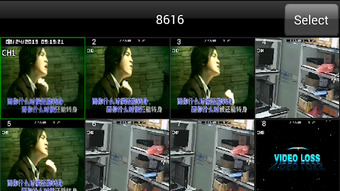
The application is built to support remote access to DVRs, allowing users to monitor their premises from any location with an internet connection. Key functionalities include real-time video streaming, playback of recorded videos, PTZ (Pan-Tilt-Zoom) control for camera adjustment, audio monitoring, and the ability to capture snapshots of live feeds. Additionally, users can configure system settings and manage device parameters through the mobile interface. The developer did not provide additional details about the underlying architecture or specific use-case scenarios beyond general remote monitoring.
Key Features & Capabilities
- Remote Live Video Streaming – Enables real-time viewing of video feeds from connected DVRs, allowing users to monitor their environment instantly from any location.
- Video Playback – Supports playback of recorded video footage, both remotely and locally, for reviewing past events or incidents.
- PTZ Control – Offers remote control over pan, tilt, and zoom functions of compatible cameras, enhancing situational awareness.
- Audio Monitoring – Allows users to listen to audio from connected cameras, improving the context of surveillance data.
- Snapshot Capture – Lets users take still images of live video streams for documentation or reporting purposes.
- System Configuration – Provides access to device settings, enabling users to adjust parameters such as recording schedules, network settings, and user permissions.
- Mobile Accessibility – Designed with a user-friendly interface optimized for touch-based navigation on Android devices.
These features collectively support efficient surveillance management, making XR960-CMS suitable for both personal and professional use. For example, a retail store manager could use the app to check store activity during off-hours, while a security team might monitor multiple sites simultaneously. The application’s ability to function across different network environments adds to its practicality in real-world deployments.
User Interface, Workflow & Performance
The user interface of XR960-CMS is designed with simplicity and accessibility in mind, featuring a clean layout optimized for touchscreens. Navigation is intuitive, with clearly labeled icons and menus that allow users to switch between live viewing, playback, and system settings with minimal effort. The workflow is streamlined to reduce the number of steps required to access critical functions, such as initiating a live stream or capturing a snapshot.
Performance observations are based on general software behavior patterns. The developer did not specify resource usage details, including CPU or RAM consumption. However, given the application’s size of 12.6 MB and its focus on video streaming, it is expected to require a stable internet connection for optimal performance.
Stability during prolonged use was not detailed in the provided information. Users may experience delays or buffering depending on network speed and DVR processing capabilities. The application is designed to run in the background and respond promptly to user inputs when connected.
Compatibility & System Requirements
XR960-CMS is compatible with Android operating systems version 2.2 and above. The installation package size is 12.6 MB, indicating a lightweight footprint suitable for most modern Android devices. The developer did not provide specific hardware requirements, such as minimum RAM, processor speed, or storage space beyond the APK file size.
Platform compatibility information is limited to Android, with no mention of support for iOS, Windows, or other platforms. The application is intended for use with Xvision DVR systems, though the exact model range or integration requirements were not specified. Users should ensure their DVRs are configured to accept remote connections and are accessible over the internet or local network. The developer did not list any additional dependencies or prerequisites for installation.
Pros and Cons
Pros
- Free to download and use, making it accessible for budget-conscious users.
- Supports remote live video streaming and playback of recorded footage.
- Includes PTZ control and audio monitoring for enhanced surveillance capabilities.
- Offers snapshot capture for quick documentation of events.
- User-friendly interface designed for easy navigation on mobile devices.
- Lightweight installation size of 12.6 MB.
Cons
- Compatibility limited to Android 2.2 and above, excluding newer devices with updated OS versions.
- Exact performance details, such as CPU or memory usage, were not specified.
- No information on support for iOS or other operating systems.
- Remote access depends on proper DVR configuration and network setup.
- Developer did not provide details on update frequency or future feature roadmap.
FAQ Section
Is XR960-CMS compatible with all DVR systems?
XR960-CMS is designed for use with Xvision DVR systems. Compatibility with other brands or models was not specified by the developer.
Can I use XR960-CMS without an internet connection?
The app requires a network connection to access live video and remote playback. Local playback of recorded videos may be possible if the files are stored on the device.
Is the application safe to download and install?
XR960-CMS is distributed as a free APK file. Users should download it from trusted sources to minimize security risks.
How often are updates released for XR960-CMS?
The update frequency was not disclosed by the developer. Users should check the official source for the latest version.
Does XR960-CMS require a license or subscription?
Yes, the software is free to download and use, with no mention of licensing or subscription fees.
Final Thoughts
XR960-CMS offers a practical and accessible solution for remote DVR monitoring and management, particularly for users with Xvision systems. Its core features—live streaming, playback, PTZ control, audio monitoring, and snapshot capture—address essential surveillance needs. The lightweight design and free pricing make it a compelling choice for individuals and small organizations seeking mobile access to their security systems.
While the application lacks detailed technical documentation and platform support beyond Android, its functionality aligns well with the needs of remote monitoring. Users should ensure their DVRs are properly configured for remote access and maintain a stable internet connection for optimal performance.
Download XR960 CMS now






.png)
